FREE RESOURCE · FROM THE "APPLE" REEL
Claude Motion Apple-style animations: the brief and all 16 scene lines
By Hammad Yousuf · 1 November 2026
The brief never changes; only the scene line does: one object, one change. A brand kit alone gives on-brand but plain motion; a quality bar (Apple keynote polish) lifts it.
What Claude Motion is and who has it
Claude Motion is in beta on Team and Enterprise plans: on by default for Team, and off on Enterprise until an owner turns it on. Start it in any chat by asking for an animation, or select Output in the message box and choose Motion; or pick a Motion template in the Artifacts tab.
Each animation is code built from the Motion template. It plays like a short video, and you can edit details in chat or in the editor. To export, click Export and choose MP4. Animations start private and can be shared, and they count toward your plan's usage limits; longer or more complex ones use more.
Anthropic's guide: Get started with Claude Motion (Help Center). Not on Team or Enterprise? Use the same brief in Claude Code.
The brief that never changes
Eight parts. Parts 1 to 7 set the quality bar, format, one rule, look, motion, what never to do and a self-check. Part 8, the scene, is the only line you rewrite. The parts in [square brackets] are the orange bits: swap them for your size, length and colours. The anatomy of each part is on the Claude Motion prompt page.
Build me a motion graphic. Stick to this brief line by line:

## Quality bar
Make it look like [an Apple keynote]: every frame a UI moment from [a product launch page], [tactile, physical, polished, premium].

## Format
Canvas [1080 x 1350]. Length [6 seconds]. A seamless loop: the final frame equals the first.

## One rule
ONE hero object fills [60-70%] of the frame, makes ONE satisfying change, then resets smoothly.

## Look
Real depth: soft layered shadows, frosted glass with a bright 1px edge. [System colours], one or two per piece: blue #0A84FF, green #30D158.

## Motion
Springs on everything that moves: real mass and a small settle. Hold each end state [1.2 seconds] so it reads.

## Never
No grey placeholder bars, stock icons, emoji or clip art. No dark, noisy or full-frame gradient backgrounds.

## Self-check
Screenshot a frame every second. Review each one as [a senior Apple designer], then again at 200px wide.

## Scene
[A big glossy "Publish" button. A cursor clicks it, it squashes into a circle, a blue ring fills, it snaps to a green tick with a ripple and widens to read "Published".]
The 16 scene lines
Paste one as the ## Scene line of the brief. The number is the tile's place in the reel's grid.
Numbers and charts
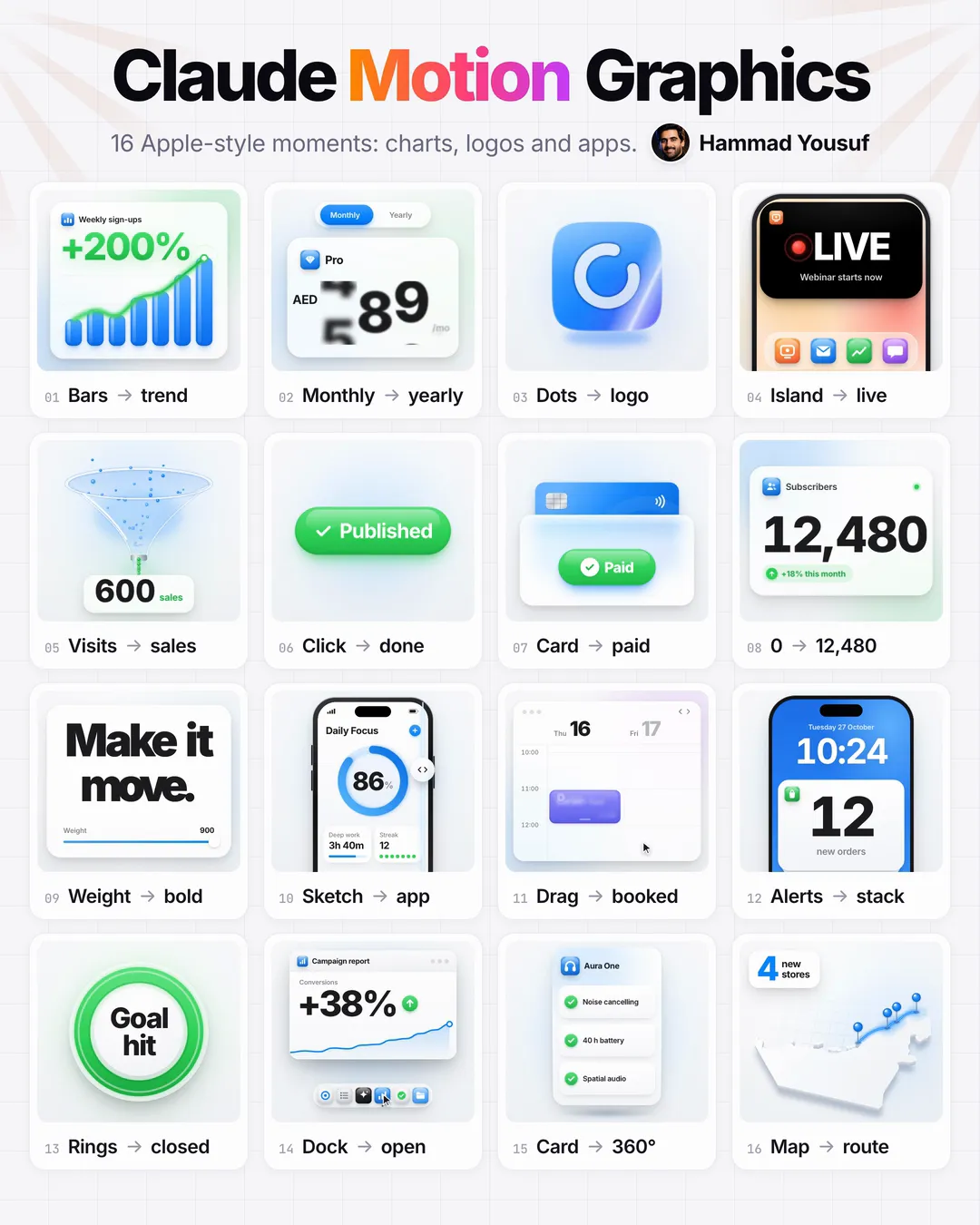
A glass "Weekly sign-ups" widget: seven blue bars spring up in turn, a glowing line threads their tops, a dot rides it and "+200%" lands big in green.A Monthly | Yearly switch over a "Pro" price card: the pill springs across, AED 29 rolls to AED 290 and a "2 months free" badge pops in.A tilted glass funnel: a shower of glowing dots pours in, a few drip out the bottom and a counter rolls up to "600 sales".A "Subscribers" widget: every digit rolls on its own like a mechanical counter from 0 to 12,480, blurred while fast, then "+18% this month" springs in.A green ring sweeps round with a glowing tip, closes with a small burst and "Goal hit" lands big in the middle.Buttons and payments
A big glossy "Publish" button: a cursor clicks, it squashes, becomes a circle whose blue ring fills, snaps to a green tick with a ripple and reads "Published".A blue card rises out of a wallet pocket, light runs round "Pay AED 4,850", a green tick lands with "Paid" and the card slides home.Phone and app screens
The black pill at the top of a phone stretches into a live card: 3, 2, 1 flips, then a pulsing red dot and "LIVE · Webinar starts now", and it shrinks back.A pencil wireframe of a "Daily Focus" app inside a phone; a wipe handle sweeps across and the finished screen is underneath: an 86% ring and two cards.A glass week calendar: a cursor drags an event onto Thursday 11:00, it snaps into the slot, turns purple, reads "Call with Sam" and an avatar drops in.A lock screen at 10:24: "New order AED 42" and "New order AED 96" drop in with springs, stack into a pile and the badge counts up to "12 new orders".A dock of six original glossy icons: a cursor glides along, they magnify, one bounces twice and a window zooms out of it: "Campaign report +38%".Brand and product
About 150 glossy blue beads drift in, swirl once and click together into an original squircle mark with a cut-out arc, then a glint crosses it."Make it move." sweeps from hairline to heavy letter by letter like a wave, a weight slider follows, and the full stop turns into a blue dot that bounces.A product card for "Aura One" headphones, AED 549, turns a full 360° with a moving highlight, shows three feature ticks on its back and lands front.A tilted light map of the UAE: pins bounce onto Abu Dhabi, Dubai, Sharjah and Ras Al Khaimah, a glowing route draws between them and "4 new stores" lands.How to use it
- In a Claude chat, pick Output, then Motion.
- Paste the Apple-quality brief.
- Rewrite one line: the scene (one object, one change).
- Send it, preview it, then Export → MP4.
- No Team plan: paste the same brief into Claude Code and ask for one HTML file.
- Open the file in your browser.
No Team plan? The Claude Code route, and the zip
Claude Code reads files and writes code into a project, so the same brief can be built as one HTML file. Paste the full brief with your scene line, then add this:
Build this as one self-contained HTML file. Drive every frame from the time alone and expose window.seek(seconds) so any frame can be rendered. Then open it in my browser.That is how all 16 loops in the reel were built: in Claude Code, not in Claude Motion. They are yours to open, read and change.
Download all 16 HTML loops (zip, 248 KB)brief.txt, tokens.css and claude-motion-apple/ with the 16 tiles, apple.css, scenes.js and a poster.html that lays them out as the grid. Open any tile in a browser; it loops on its own.For a brand's own look instead of Apple's, see Claude motion graphics: the style file, the brief and 16 scene lines.
The style rule
Borrow Apple's look, never its logo, product shots or font.
- Every animation in the reel is our own HTML, CSS and canvas drawing; no Apple logo, product shot or font appears.
- Prices are in AED, the map is the UAE (Abu Dhabi, Dubai, Sharjah, Ras Al Khaimah) and the product is our own "Aura One".
- The two system colours in the brief, blue #0A84FF and green #30D158, are Apple's published dark-appearance systemBlue and systemGreen.
Common questions
Who can use Claude Motion?
Claude Motion is in beta on Team and Enterprise plans: on by default for Team, and off on Enterprise until an owner turns it on. Start it in any chat by asking for an animation, or select Output in the message box and choose Motion.
How do I export an animation as a video?
Click Export and choose MP4. Animations start private and can be shared. They count toward your plan's usage limits; longer or more complex ones use more.
I am not on a Team or Enterprise plan. Can I still use the brief?
Yes. Paste the same brief into Claude Code with the add-on line on this page. Claude Code reads files and writes code into a project, so it builds the scene as one self-contained HTML file you open in your browser. That is how the 16 loops in the reel were built.
Were the animations in the reel made in Claude Motion?
No. They were built in Claude Code from the same brief, each as one HTML file driven by window.seek(seconds), then rendered to video. The zip on this page holds those exact files.
Why does the brief never change?
Parts 1 to 7 (quality bar, format, one rule, look, motion, never, self-check) set the standard once. Only part 8, the scene, describes a specific animation: one object, one change. Swapping the scene line is all it takes for a new loop in the same style.
Official links
Sources checked
- Claude Motion is in beta on Team and Enterprise plans (on by default for Team; off on Enterprise until an owner turns it on). Source ↗
- Start it in any chat by asking for an animation, or select Output in the message box and choose Motion; or pick a Motion template in the Artifacts tab. Source ↗
- Each animation is code built from the Motion template; it plays like a short video, and you can edit details in chat or in the editor. Source ↗
- Export: click Export and choose MP4; animations start private and can be shared. Source ↗
- Animations count toward the plan's usage limits; longer or more complex ones use more. Source ↗
- Claude Code reads files and writes code into a project, so the same brief can be built as one HTML file. Source ↗
- Apple's system colours used in the brief: blue #0A84FF and green #30D158 (dark-appearance systemBlue/systemGreen). Source ↗
About the video: the reel has no presenter and no voice. The 16 animations in it were built in Claude Code from the brief on this page, not in Claude Motion.