YOU COMMENTED "BRAND" — HERE IT IS
Claude motion graphics: the style file, the brief and 16 scene lines
By Hammad Yousuf · 27 October 2026
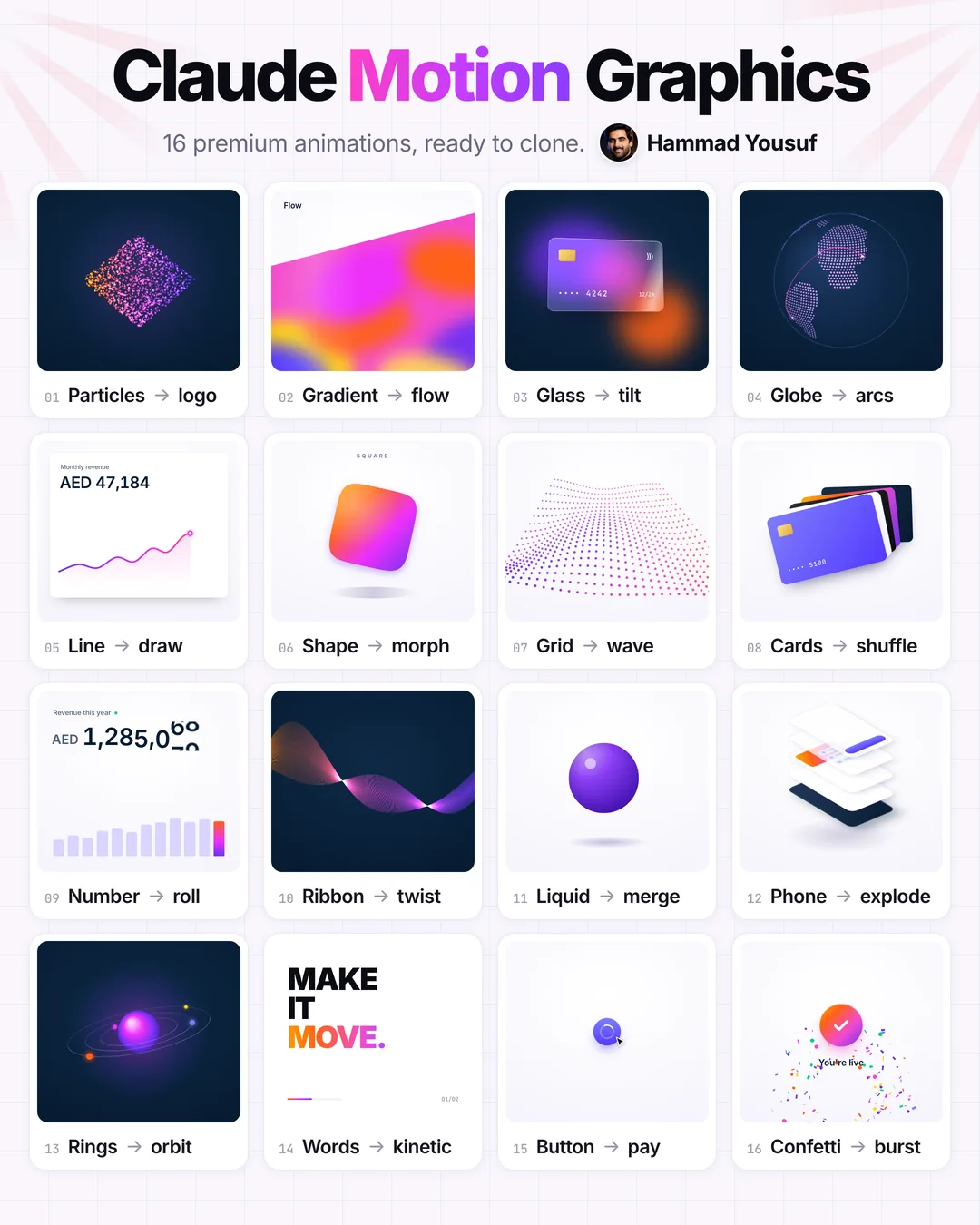
Yes, Claude can make real motion graphics. Give Claude Code a brand's real CSS values instead of adjectives, put one short brief under them, then add one line per animation: one object, one change. Each result is a single HTML file and a seamless 6-second loop. These 16 came from one style file.
The 6 steps
Steps 1 to 3 clone the look once per brand. Steps 4 to 6 repeat for every animation.
- Run the style-file prompt. Open Claude Code in an empty folder and paste the style-file prompt below, with the brand's website in the first line.
- Point Claude Code at the brand's website. It downloads the home page and every stylesheet it links, the same files your browser loads.
- Get one style file. It measures the colours, corners, shadows, easing curves and type that the CSS actually uses and writes them into style.md.
- Paste the motion brief under the style file. The brief sets the rules every animation follows: one HTML file, 560 by 500, a seamless 6-second loop, the style file's colours and motion only.
- Add one line: one object, one change. For example: Button -> pay: a cursor clicks Pay, the button shrinks to a spinner, ticks green and opens into Paid.
- Open the HTML file in your browser. Claude writes one file per scene. Double-click it: it plays and loops. Ask for one change at a time if something looks off.
Steps 1 to 3: the style-file prompt
Paste it into Claude Code once per brand. Replace [BRAND] with the site you want to learn from.
Read the public website https://[BRAND].com: download the home page HTML and every stylesheet it links,
then write style.md: the brand's look as rules another model can follow. Measure, don't guess:
count the colours, radii, shadows, easings, durations, fonts, weights and letter-spacing that actually
appear in the CSS and keep the most used ones.

style.md sections: Colour (ink, brand, dark and light surfaces, accents, and the brand gradient in order),
Shape (corner radii by size, the shadow), Type (font; if it is a paid font, name the closest free one),
Motion (the main cubic-bezier, durations for small things and panels, how things enter and settle).
Under 40 lines. Hex values and numbers only, no adjectives without a number.
Never copy the logo, the brand name, photos or the paid font itself.
The style file it wrote for Stripe
This is the file behind all 16 loops. Use it as it is for a Stripe-style look, or as a model of what your own should contain.
# Style file: Stripe-style motion

Written by Claude Code from stripe.com's public CSS (homepage and its three stylesheets, read 2026-10-18).
Paste it at the top of every animation request. It copies colours, corners, shadow and motion, never the logo, the
name or the paid Söhne font (Inter is the free stand-in).

## Colour
- Ink (headings and body): #061b31 · soft text #50617a
- Brand purple: #533afd (buttons, links) · classic blurple #635bff · light #7f7dfc · deep #4032c8
- Dark surface: #061b31, lifted panels #0d253d and #1a2c44
- Light surface: #ffffff and #f6f9fc, hairlines #e5edf5
- Success: #00d66f
- The loud gradient, in this order: #ffd601 yellow → #ff6118 orange → #f44bcc magenta → #7232f1 violet → #533afd purple.
  Use it on one hero object per scene, never on text blocks.

## Shape
- Corners: 4px on small controls, 6px on cards and buttons, full pills for badges and pay buttons.
- Shadow (the double drop): 0 27px 40.5px -27px rgba(50,50,93,.25), 0 16.2px 32.4px -16.2px rgba(0,0,0,.1).
- Payment cards: 1.58:1, chip top left, "•••• 4242" in a monospace, expiry bottom right.

## Type
- Inter, weights 400 and 600 (800-900 only for one kinetic headline).
- Headlines letter-spacing -0.02em, body -0.01em. Numbers tabular.

## Motion
- Main curve: cubic-bezier(.25, 1, .5, 1) (a quick start that settles softly). Cards: cubic-bezier(.165, .84, .44, 1), 800 ms.
- Small things 300 ms, panels 500-800 ms. Nothing bounces more than once.
- Things snap into place and then hold still; one change per scene.
- Every scene is a 6 second loop whose last frame matches its first.
Step 4: the motion brief
Paste it under the style file. The last line is where each scene line goes.
Make one animation as a single HTML file that opens by double-click in any browser.

- Canvas: 560 x 500, scaled to fit the window, centred. Light or dark background from the style file only.
- One object, one change: the scene line below names both. Nothing else moves except a slow ambient drift.
- Loop: exactly 6 seconds, and the last frame equals the first, so it can repeat forever without a jump.
- Draw every frame from the time alone (t = seconds % 6). No setTimeout chains and no CSS animations that
  drift: it must look the same on every play and every machine.
- Use the style file's colours, corners, shadow, curve and font. No logos, no brand names, no photos.
- Keep it light: canvas or plain DOM and CSS, no libraries, under 200 lines.
- Expose window.__seek(t) that draws the frame at t seconds, so the loop can be recorded frame by frame.

Scene: [OBJECT] -> [CHANGE]: [one sentence: what it looks like and what happens]
Step 5: the 16 scene lines
One object, one change. Use one line per request; the file name is the one in the download.
- Particles → logo: Particles hold a diamond mark, burst into a slow ring, and snap back. tiles/01-particles-logo.html
- Gradient → flow: The loud gradient under a slanted edge, its colour bands drifting like liquid. tiles/02-gradient-flow.html
- Glass → tilt: A frosted glass card over two colour glows tilts in 3D while one sweep of light crosses it. tiles/03-glass-tilt.html
- Globe → arcs: A dotted globe turns once per loop while payment arcs fly out of Dubai. tiles/04-globe-arcs.html
- Line → draw: A revenue card counts up while its line draws in left to right, then a +128% badge pops. tiles/05-line-draw.html
- Shape → morph: One gradient shape melts from circle to square to star to blob and back, its name above. tiles/06-shape-morph.html
- Grid → wave: A field of dots in perspective rolls like a sheet of silk. tiles/07-grid-wave.html
- Cards → shuffle: Five payment cards in a fanned deck; the front card flicks out and slides to the back. tiles/08-cards-shuffle.html
- Number → roll: A revenue figure rolls up digit by digit like an odometer while the bars grow under it. tiles/09-number-roll.html
- Ribbon → twist: A ribbon of 70 hairlines twists through itself, orange on the left to violet on the right. tiles/10-ribbon-twist.html
- Liquid → merge: Three glossy purple drops drift together, merge into one, then pull apart. tiles/11-liquid-merge.html
- Phone → explode: An isometric phone lifts its screen, card, list and button apart into layers, then snaps shut. tiles/12-phone-explode.html
- Rings → orbit: A glowing planet with tilted rings; three moons orbit at different speeds, passing behind it. tiles/13-rings-orbit.html
- Words → kinetic: Three heavy words slide up one at a time, the last in the gradient; then the next phrase. tiles/14-words-kinetic.html
- Button → pay: A cursor clicks Pay, the button shrinks to a spinner, ticks green and opens into Paid. tiles/15-button-pay.html
- Confetti → burst: A gradient tick pops and confetti bursts out, tumbles and falls away. tiles/16-confetti-burst.html
Scene: Particles -> logo: Particles hold a diamond mark, burst into a slow ring, and snap back.
Scene: Gradient -> flow: The loud gradient under a slanted edge, its colour bands drifting like liquid.
Scene: Glass -> tilt: A frosted glass card over two colour glows tilts in 3D while one sweep of light crosses it.
Scene: Globe -> arcs: A dotted globe turns once per loop while payment arcs fly out of Dubai.
Scene: Line -> draw: A revenue card counts up while its line draws in left to right, then a +128% badge pops.
Scene: Shape -> morph: One gradient shape melts from circle to square to star to blob and back, its name above.
Scene: Grid -> wave: A field of dots in perspective rolls like a sheet of silk.
Scene: Cards -> shuffle: Five payment cards in a fanned deck; the front card flicks out and slides to the back.
Scene: Number -> roll: A revenue figure rolls up digit by digit like an odometer while the bars grow under it.
Scene: Ribbon -> twist: A ribbon of 70 hairlines twists through itself, orange on the left to violet on the right.
Scene: Liquid -> merge: Three glossy purple drops drift together, merge into one, then pull apart.
Scene: Phone -> explode: An isometric phone lifts its screen, card, list and button apart into layers, then snaps shut.
Scene: Rings -> orbit: A glowing planet with tilted rings; three moons orbit at different speeds, passing behind it.
Scene: Words -> kinetic: Three heavy words slide up one at a time, the last in the gradient; then the next phrase.
Scene: Button -> pay: A cursor clicks Pay, the button shrinks to a spinner, ticks green and opens into Paid.
Scene: Confetti -> burst: A gradient tick pops and confetti bursts out, tumbles and falls away.
Rules that keep it clean
- Copy colours, corners, shadows and motion. Never copy a logo, a brand name or photos.
- Never ship a paid font you have not licensed. Stripe's site font is Söhne, a commercial typeface, so this style file uses Inter (free, SIL Open Font License).
- One object, one change per scene. More than one change and the loop stops reading as Stripe-calm.
Official links
Sources checked
- The style file's values (#635bff, #533afd, the yellow-orange-magenta-violet gradient, 4 and 6 px corners, the double shadow, cubic-bezier(.25, 1, .5, 1)) were measured in stripe.com's public CSS on 18 October 2026. Source ↗
- Stripe's site font is Söhne, a commercial typeface sold and licensed by Klim Type Foundry. Source ↗
- Inter is free under the SIL Open Font License. Source ↗
- Claude Code reads files and web pages and writes code in your project folder. Source ↗
About the video: no presenter this time. Every frame of the reel is the 16 HTML files above, recorded in a browser, with synthesized music. The small byline photo is an AI avatar of Hammad Yousuf.