FREE RESOURCE · FROM THE "GUARD" GRAPHIC
AI guardrails explained: a practical checklist
By Hammad Yousuf · 9 November 2026
Guardrails are checks around model inputs, outputs and actions. They help an application detect particular failures and decide what happens next. A passing check means that its configured rule passed; it does not establish that every statement is true or every action is appropriate.
Start with a concrete failure
Write down what your application must accept and reject. For a support-ticket classifier, that might be an allowed category, a required ticket identifier and a short explanation. Keep a few valid examples and a few broken examples beside the specification. This makes the checks reviewable before you connect a model.
Separate structure from meaning
A schema can check required fields, types and constraints. Pydantic models describe these requirements and validate the resulting object. Type correctness is different from factual correctness: a correctly typed customer identifier can still name the wrong customer. Verify meaning against the evidence or system of record appropriate to the task. Pydantic models
Understand the Guard object
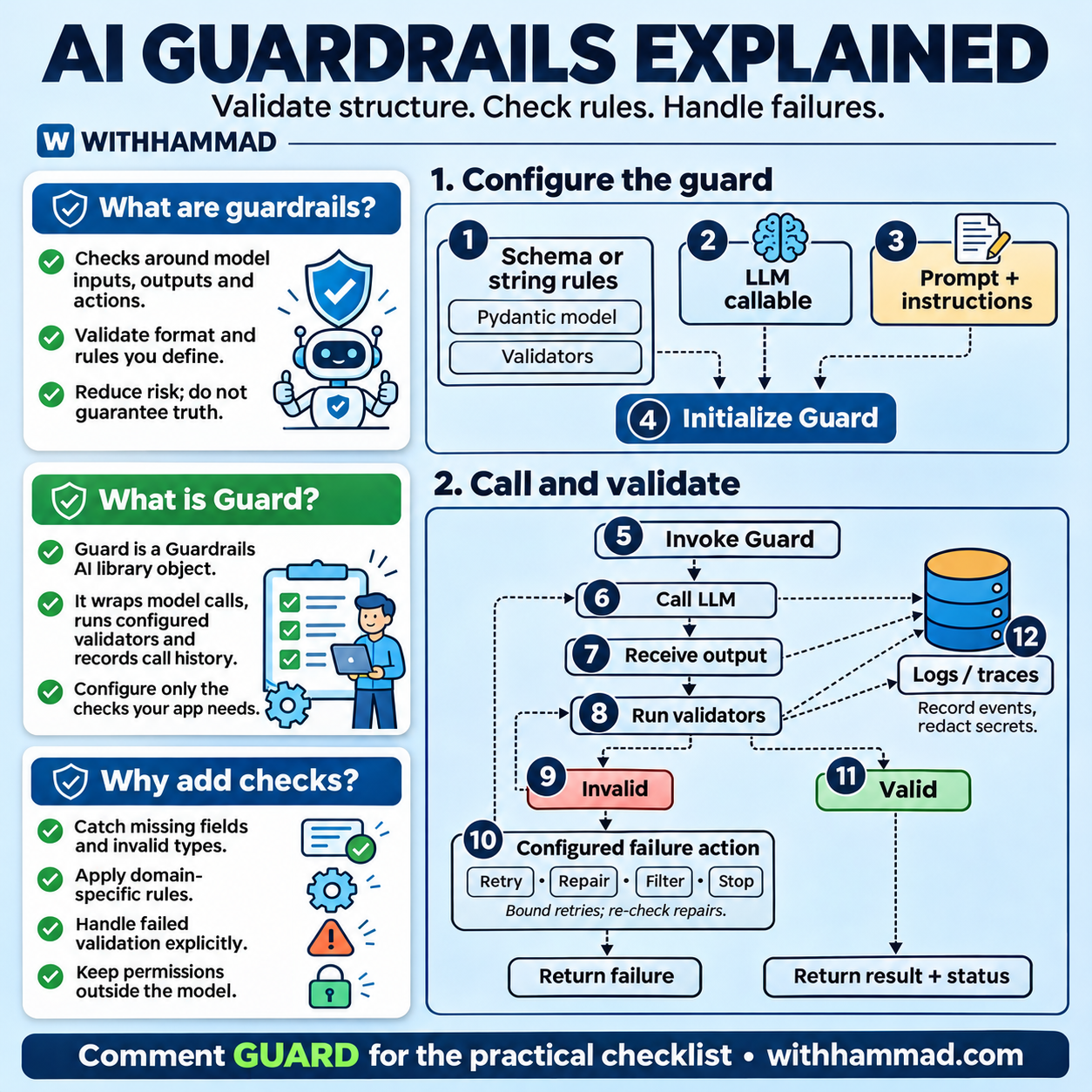
The infographic uses Guardrails AI as a concrete example. Its Guard object wraps model calls, orchestrates configured validation and keeps call history. It can also validate output generated elsewhere through the parse route. Configure the checks your application needs; creating an object alone does not define every relevant requirement. Guardrails AI documentation
Choose a failure action before release
Decide whether a failed result should be rejected, sent for review, filtered, repaired or retried. Put a limit on attempts and record the final status. A repair must pass the relevant checks before it is treated as successful. Repeating the same prompt without a stopping condition can add latency and cost without fixing the underlying problem.
Keep permissions in application code
A model's proposed action is a request to the application, not permission to perform it. Check identity, record access and allowed operations before tools execute. For an action that needs approval, present the specific proposed change and obtain that approval before execution. A valid JSON object should never bypass this decision.
Keep useful records without exposing secrets
Log which check ran, whether it passed, which failure action was selected and how the run ended. Use identifiers or redacted examples when full prompts and outputs contain personal or confidential information. Give logs appropriate access controls and retention limits. The diagram's log arrows represent observability, not a requirement to save every input verbatim.
Test the whole path
Visual reference: Sadik Mohammad's guardrails infographic, redrawn for WITHHAMMAD with concise wording and clearer failure handling. This is a practical design checklist; the exact validators and controls depend on the application.
- Valid input reaches the expected result.
- Missing or malformed fields are handled explicitly.
- A plausible but unsupported answer is not mistaken for verified evidence.
- A retry stops at its configured limit.
- A tool cannot access a record outside the caller's permissions.
- Failure status remains visible to the caller and in the trace.
Sources and documentation
Keep going
- Trace permissions and tool execution in an agent harness
- Understand retrieval before evaluating its answers
- Build evaluation into your agent learning plan
- All free resources from the reels
- More free prompts from my reels
- Follow @withhammad.ai on Instagram for the next one
- Subscribe to @with.hammad on YouTube