FREE RESOURCE · FROM THE "VECTORS" GRAPHIC
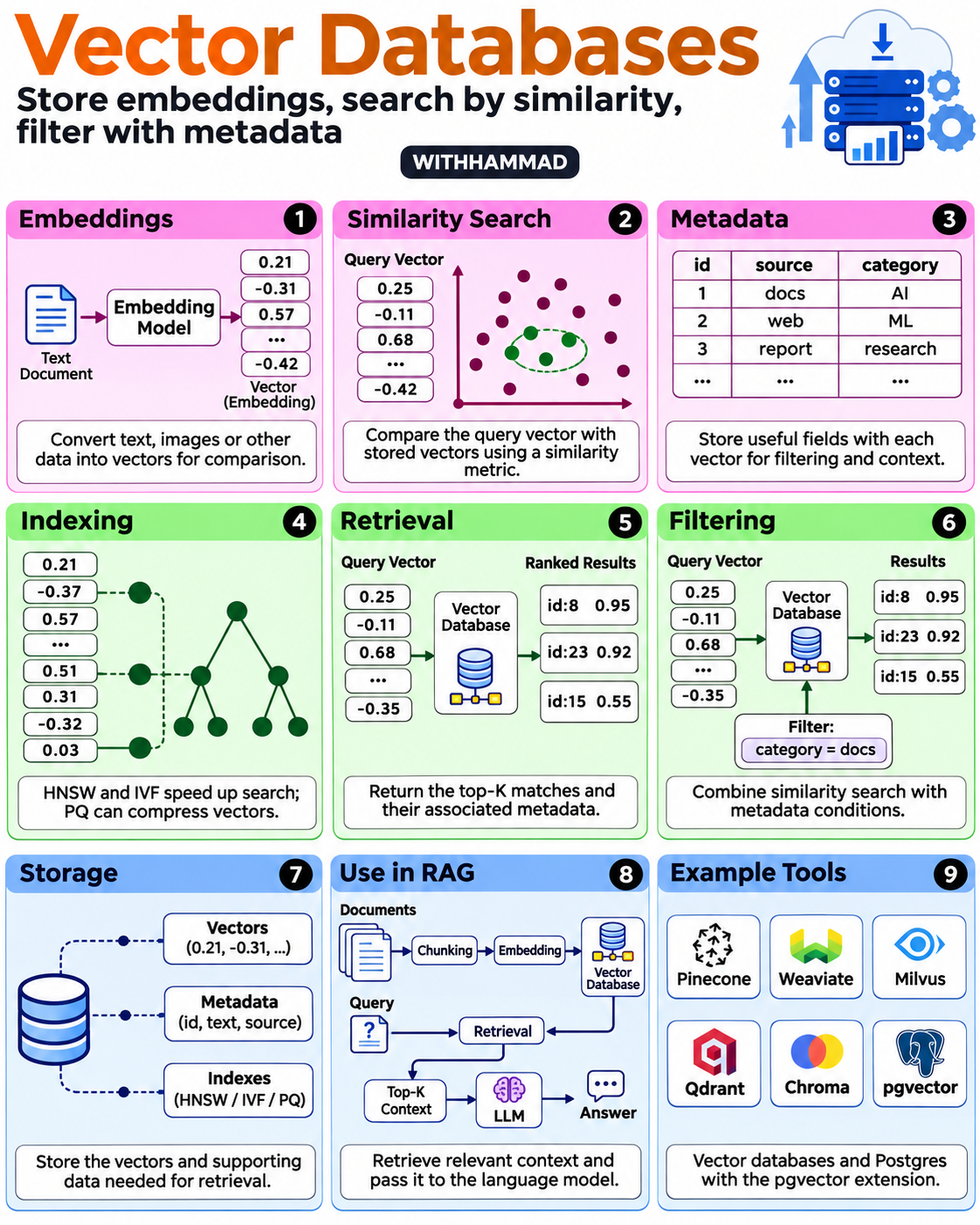
Vector databases explained in nine panels
By Hammad Yousuf · 8 November 2026
A vector is a list of numbers. An embedding model converts content into vectors that can be compared. A retrieval system uses those comparisons to rank candidate records; a high similarity score is not a guarantee of factual relevance or correctness.
1. Create embeddings
Split your content into useful units and embed them with a model suitable for the task. Keep the original text and its source. Use compatible embeddings for stored content and queries. If you change the embedding model, check compatibility and plan any required re-indexing.
2. Search by similarity
Embed a query and compare it with the stored vectors using the system's supported metric. Scores depend on the metric and implementation: an illustrative similarity of 0.95 is not a universal confidence score or a 95% probability of correctness.
3. Store metadata
Attach fields such as source, document ID, date and access scope. Metadata filtering can restrict which records are eligible for retrieval. The filtering syntax and supported operators depend on the database. Pinecone metadata filters
4. Understand indexes and compression
Exact search evaluates the available candidates directly. Approximate indexes trade some recall for search speed. HNSW and IVF are common indexing approaches; product quantization is a vector-compression method used in some search systems. Their memory, speed and quality tradeoffs depend on the dataset and parameters. pgvector documentation, FAISS documentation
5. Retrieve and filter
Return a small set of relevant candidates and their source metadata. Combine similarity with appropriate filters, then inspect results on real questions. Do not assume a good embedding model fixes missing documents, poor chunk boundaries or incorrect access rules.
6. Use retrieval in RAG
Pass selected passages to the language model as context, with their source references. Ask the model to distinguish sourced information from uncertainty. Test cases where there is no relevant answer. Retrieval improves access to information; it does not remove the need to evaluate the model's response.
7. Compare storage choices
The infographic shows Pinecone, Weaviate, Milvus, Qdrant, Chroma and pgvector as examples, not a ranked recommendation. pgvector is an extension for PostgreSQL, rather than a separate hosted database. FAISS, mentioned in the supporting material, is a search and clustering library. pgvector, FAISS
Start with a representative dataset and a list of queries with known relevant documents. Compare retrieval quality, filtering behavior, latency, memory, update needs, operations and cost. Use those measurements to decide whether an additional database is warranted.
A small evaluation checklist
Visual reference: Sumit Gupta's nine-panel infographic, adapted with WITHHAMMAD branding and clearer distinctions between indexing, compression and storage.
- Can it retrieve the passages you expect for your actual questions?
- Do filters enforce the intended data scope?
- Does it handle additions, edits and deletions correctly?
- Does the final answer cite the retrieved evidence and admit missing information?
- Are latency, memory and cost acceptable at the scale you need?